Opening the Widget Editor
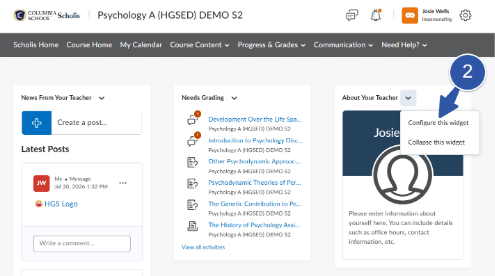
- Go to the course section you want to set up and locate the About Your Teacher widget on your course homepage.
- Click the dropdown arrow (or gear icon) on the widget and select Configure this Widget to open the editor.
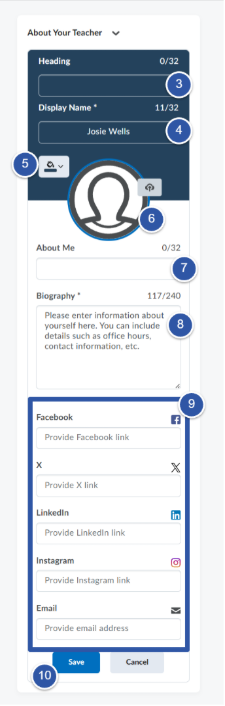
- Remove the heading. Turn off or clear the widget heading so no title text displays above your information.
- Set the display name to your full name. Enter your first and last name exactly as you'd like students to see it.
- Set the header color. In the color field, enter the hex code 24425C for the header area.
- Upload your headshot. Upload an approved, professional headshot. Use a clear, front-facing photo with a plain background.
- Remove the “About Me” label. Turn off or clear the “About Me” heading so it does not display.
- Add your biography. Write a short biography with a 240-character limit. Keep it warm, professional, and student-friendly.
- Do not add any other links. Leave all additional link fields empty—no social media, personal sites, or extra URLs.
- Click Save (and Close, if prompted) to apply your changes.
Your Biography (240 characters)
Aim for two or three short sentences. A simple structure works well:
- What you teach and how long you've been teaching.
- One or two personal touches (interests, hobbies, or what you enjoy about teaching).
- A warm, welcoming closing line for students.
- Heading: removed
- Display name: your full name
- Header color: 24425C
- Photo: approved professional headshot
- “About Me” label: removed
- Biography: 240 characters maximum
- Links: none
Standards at a Glance
Please note: At this time, this widget must be set up separately for each course section. As new courses are assigned to you, repeat these steps in each one.