Getting Started
This page provides quick access to the tools you need to facilitate and review live instruction.
Here you will find:
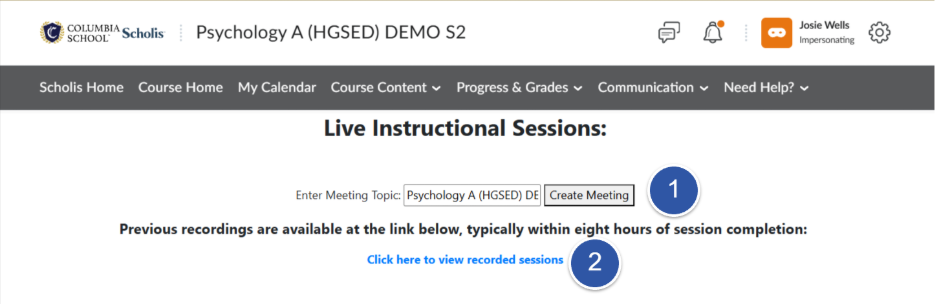
- Launch Live Session – Use this link to start your scheduled Zoom classroom and connect with your students. At the designated time, select “create meeting” to begin the Zoom session. A recording of the class session will begin automatically. Students cannot launch a session but will be able to attend a live session that you launch.
- Recorded Sessions Library – Access recordings of previously conducted live sessions for review, student support, or administrative reference. Students will have access to all recorded sessions. They will appear within eight (8) hours after a session is completed.
Whether you're preparing to teach a session or reviewing a past lesson, these resources are available to help you manage your live classes efficiently. If you experience any issues accessing your live session or recordings, please contact the Help Desk for assistance.